
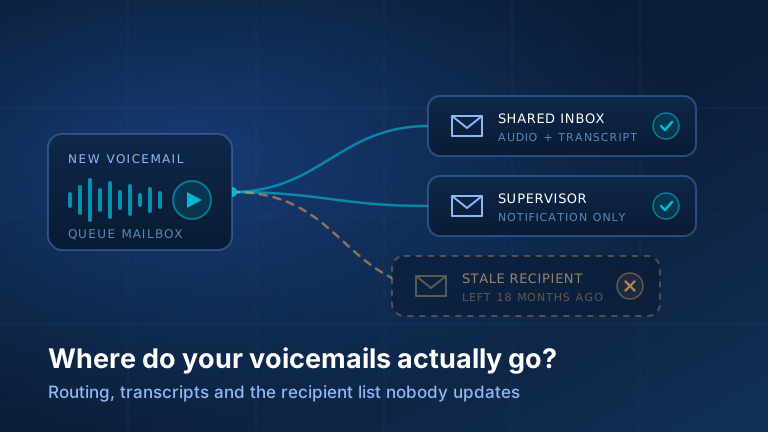
In 3CX, voicemail to email looks like a checkbox on an extension, and that is why it keeps breaking. It is not a checkbox, it is a routing design. Turning it on answers the easy question, whether messages leave the phone system at all. It never asks the one that matters: when a caller leaves a message in this particular mailbox, who finds out, how quickly, and what happens when that person is away, or left eighteen months ago.
That last case is why this is an operations problem, not a settings tour. A stale recipient does not throw an error: the system records the message and the mail server delivers it perfectly to an address nobody reads any more. Every light stays green. The result is a silent black hole that can run for months, and for plenty of businesses a missed voicemail is not an inconvenience, it is a lost customer at the worst possible moment.
Start with a map, not with settings
Before changing anything, find out what your system does today. Half an hour on a typical small business PBX.
- List every mailbox, not every person. Extensions with voicemail enabled, plus every queue and ring group that sends unanswered callers to voicemail, which is where the surprises are.
- Record the delivery mode for each: no email, notification without audio, notification with the recording attached, or attached-then-deleted from the PBX.
- Write down the actual recipient addresses. For an extension, the Admin Console under Users, in that user’s Voicemail settings. For a queue or ring group, under Call Handling on its Notifications tab.
- Check every address against your staff list. Anyone who has left or moved alias is a black hole. Departed staff on a queue recipient list is the most common single fault we find.
- Note which mailboxes have transcription enabled, and whether each inherits a department setting or overrides it. Inheritance is where transcripts stop for one team only.
- Leave a test message in every mailbox. Say the mailbox name and time in the recording, then check how long it takes, whose inbox it lands in, and the junk folder.
- Check who receives system alerts. In the Admin Console under System, the Alerts page decides who is warned about problems including voicemail disk quotas, with recipients set to system administrators, system owners, or extra addresses. A full voicemail store stops accepting messages.
We deliver this as a one-page table: mailbox, mode, recipients, transcription, last verified. Keep it with your offboarding checklist, because that is the process that breaks it.
Per person, shared inbox, or the front desk
Per person is the default and right for most direct extensions, because accountability is obvious. It fails on absence: if that person is out for a week, so is their voicemail. The fix is a forwarding rule and a named cover person.
Everything to one shared address suits the main line, the sales mailbox, and anything where the business cares that a message is handled rather than who handles it. Its failure mode is diffusion of responsibility: five people see a message and all five assume one of the other four has it, so somebody must own it explicitly.
Delivery to the front desk suits businesses where messages need acting on in minutes, and needs the most maintenance, because coverage changes through the day. One office we set up moved off a shared alias to front-desk delivery and found within a fortnight that the hours, not the design, were wrong: messages left after coverage ended arrived where nobody was sitting. The answer was day-part routing. If staffing varies through the day, build that in.
Queue voicemail: the recipient list everyone forgets
Queue and ring group voicemail belongs to no person, so it never gets cleaned up when a person leaves. In 3CX V20, queues and ring groups live under Call Handling in the Admin Console, with their voicemail settings on the Notifications tab. There you set the supervisors, who receive general queue notifications and handle messages left in the queue voicemail box, plus the greeting and the voicemail delivery email options. Those options control whether messages go by email only, are cloned into each member's voicemail box, or go only to extra recipients you nominate. Later V20 updates extended this further, including delivery to a mailing list, so wording depends on your update.
Two consequences. First, that extra-recipients field holds literal addresses stored on the queue, and no HR process or user-deletion routine touches it. When somebody leaves ops their address stays on the list, and if they were the only recipient the queue’s messages go nowhere. Add queue recipient lists to your offboarding checklist by name, alongside the accounts and the door fob.
Second, use a distribution group rather than individual addresses wherever your mail platform allows. One group address on the queue, membership managed where you already manage staff changes. That turns a phone system task nobody remembers into a mail task somebody already does, and heads off the drift we describe in our notes on phone system configuration bugs and how they surface.
Transcripts: text of every message
Transcription is the feature clients notice the moment it stops: it turns voicemail from something you listen to into something you skim.
In V20 the engine is selected once, system wide, in the Admin Console under Integrations on the Transcription page: choose the engine, set the language or let it be detected automatically, save. 3CX’s own cloud service requires the appropriate licence edition; the platform can instead point at an external speech service under your own cloud account, with its own licence requirements and costs. Which tier you need depends on both the engine and your edition, and 3CX has changed this more than once, so treat any figure you read online, ours included, as a prompt to check your own system.
Scope is set separately, and that is where transcripts go missing for one team. Transcription options are configured per department, per user, and per queue or ring group, each from the Options tab of that object. Queues and ring groups either follow their department’s setting or override it, so if transcripts stop for one queue only, that override is the first place to look.
What accuracy to expect
Speech recognition is very good on clear speech in the configured language and worse on what voicemail is full of: background noise, callers in cars, strong accents, and above all proper nouns. Company names, surnames and recited digits come through wrong often enough that you should never dial a number from a transcript without hearing the recording. Treat it as triage, not a transcript of record. Transcription also depends on the service being reachable from your PBX, so an update or network change can stop transcripts while voicemail carries on normally. That is why the audit has a transcription column.
3CX voicemail to email not working? Check these first
When messages stop arriving, or arrive in the wrong form, four checks find almost every cause, in this order:
- The mailbox’s delivery mode. A mailbox set to notification only sends an email with no recording, and one set to no email sends nothing. The table below shows each mode.
- The address it sends to. Each extension mails the address on its user record. A typo, a departed employee’s address, or a queue whose recipient list nobody updated (see above) all look like “voicemail to email stopped working”.
- The junk folder and mail rules. If a search of the mailbox finds the messages, the phone system did its job; the cause is on the mail side, covered further down.
- The mail server 3CX sends through. By default 3CX sends through its own public mail service, and 3CX itself notes that some mail servers flag those messages as spam. Sending through your own Microsoft 365, Google Workspace or other mail server fixes that for good, as described below.
If your PIN is the problem rather than the email, that is covered in 3CX voicemail PIN not working.
“The email came but there is no recording”
This ticket arrives regularly and is almost never a fault. It is the delivery mode doing what it was set to do, and if people expect audio and are not getting it, change the mode rather than explain it.
| Mode | What the recipient gets | What stays on the phone system |
|---|---|---|
| No email notification | Nothing by email; the message waiting light and the apps are the only signal | The message, until deleted or aged out |
| Notification only | An email saying a message is waiting, with caller and time, no audio | The message |
| Attach the recording | An email with the audio file attached | The message, so there are two copies |
| Attach and delete | An email with the audio file attached | Nothing; the email is the only copy |
Attach-and-delete deserves a deliberate decision, not a default. Once the message leaves the PBX it is gone from the web client and the apps, and the only surviving copy is an attachment in one person’s inbox, subject to their deletion habits. Recovering it means searching a mailbox, not the phone system. But 3CX has better storage controls under System in the Admin Console: a voicemail quota in gigabytes, automatic deletion of voicemails older than a set number of days, and a system-wide purge. Keep messages on the system with age-based cleanup rather than making inboxes the system of record.
Worth expecting too: attachments that play as silence. Many are genuine recordings of nothing, because nuisance callers reach voicemail and leave dead air, which the system faithfully records. Every message arriving silent is a fault worth raising, as are the questions we answer most often, collected in our guide to common 3CX voicemail questions and issues.
When it is your mail client, not your phone system
A recurring report: voicemail emails do not show up on my phone unless I search. If a search finds the message, the phone system did its job, and everything after is mail-side. Three usual causes:
- A rule or filter is moving them. Someone made a voicemail folder months ago and the mobile app only shows the inbox. Check server-side rules as well as desktop-client ones; they live in different places.
- A focused or priority inbox has sorted them aside. Automated mail from a consistent sender is exactly what those features demote. Mark the sender important; change nothing on the PBX.
- Spam filtering is quietly winning. This is the one that hides real failures.
Your phone system is a machine sending mail on your behalf, and mail providers are strict about that. 3CX can send through its own mail service or a mail server you nominate. The built-in service works, but messages then come from a sender your domain has not authorised. Routing PBX mail through your own system instead means messages come from your domain and pass the sender-authentication checks your recipients’ providers run.
So when voicemail email stops working, check a junk folder before the phone system. Messages landing in junk consistently is an authentication problem with a permanent fix, not one to fix one allow-list entry at a time. It is standard on the systems we run, described on our 3CX phone system service page.
Get the map
Most voicemail trouble we resolve is not a broken feature. It is a delivery design that was correct the day it was configured and has drifted since, because somebody left and their address stayed on a list. Nothing is wrong on the dashboard, so nobody finds it there.
Send one email to support@telnamix.com and we will audit where every mailbox’s messages actually go, across every extension, queue and ring group, then send you the map: mailbox, delivery mode, recipients, transcription. If we find addresses belonging to nobody, we will tell you before they cost you a customer. New to us? Tell us about your setup. Existing clients can raise it through our support desk.